Lock permissions
Lock permissions are currently in preview and are being rolled out progressively. You may not see them in the app yet.
Introduction
Every lock carries a contract that says who may do what during the session. The contract is agreed when the lock is created or joined: the party who sets it up decides the terms, and the other party accepts them by joining. It can be changed later, by agreement between the wearer and the keyholder.
What is never a permission
Using emergency unlock while it is enabled, unlocking under the normal rules, and resigning as keyholder do not require a permission grant.
- The wearer can always unlock when the lock's own rules allow it.
- The keyholder can always resign.
- The wearer can use emergency unlock while it is enabled. Change emergency unlock controls who can turn it on or off: a keyholder with that permission can disable it.
Permissions determine who can change the emergency-unlock setting. While it is enabled, the wearer does not need keyholder approval to use it.
The permissions
The contract covers eleven permissions. Each one names an action and says whether the wearer, the keyholder, or both may perform it.
- Add time: add time to the lock's timer.
- Remove time: remove time from the lock's timer.
- Freeze the timer: pause the countdown.
- Unfreeze the timer: resume a paused countdown.
- Change the minimum date: change the earliest date the lock can end.
- Change the maximum date: change the latest date the lock can end. This permission exists for the wearer only; the keyholder can never hold it.
- Show or hide the timer: control whether the wearer sees the remaining time.
- Show or hide time values in history: control whether time amounts appear in the lock history.
- Manage extensions: add, remove and configure the lock's extensions.
- Edit the bondage safety settings: change check-in settings, the dead man's switch, and the emergency-release countdown of a bondage lock. This permission only exists on bondage locks.
- Change emergency unlock: turn emergency unlock on or off. Either party can edit the confirmation phrase while it is on.
There is no "lock settings" permission. The lock settings page is a surface, not a permission: each field on it maps to one of the permissions above, such as the two visibility permissions and the minimum date.
Direction rules
Permissions decide who may act. Separate rules decide which direction each date limit can move:
- The wearer can only raise the minimum date, never bring it earlier. The keyholder, when granted the permission, can move it in either direction or remove it. In all cases it can never pass the maximum date.
- The maximum date can only be extended or removed, never brought earlier. Removing it is permanent: a lock without a maximum date cannot have one added later.
Even a wearer holding the "Change the maximum date" permission cannot shorten the maximum date, and the keyholder can never touch it at all.
Presets
The contract usually takes the form of a preset. Each preset is shown on the consent screens with the sentence below.
- Standard: the safe default. The keyholder runs the session and the wearer keeps their safety rails. Consent sentence: "The keyholder runs the session with the usual controls; extensions stay as configured."
- Trusted keyholder: Standard, plus extension management and emergency-unlock setting changes for the keyholder. The keyholder can turn emergency unlock off. Review both grants before accepting this preset.
- Full trust: every permission each party can hold. Consent sentence: "Wearer and keyholder can both change anything at any time."
- Custom: any other mix of permissions, picked by hand. If a custom contract is edited back to a preset's exact settings, it snaps to that preset.
Safety settings
Under Standard, neither party can turn emergency unlock on or off after starting. Trusted keyholder grants this control to the keyholder; Full trust grants it to both parties; Custom follows the selected grants. Either party can edit the confirmation phrase while emergency unlock is on. A keyholder who can change this setting can disable emergency unlock.
Where the contract is agreed
The contract is always shown before it binds anyone.
- At self-lock creation: the wearer picks the terms in the "Safety & control" section of the lock creation form. A self-lock's permissions cannot be changed after creation.
- When the wearer joins a shared lock: the join screen shows the preset name and its sentence, plus everything that differs from Standard, both what a party gains and what a party loses. A "View all permissions" section lists the full contract. Joining is accepting.
- When the keyholder accepts a keyholding request: the confirmation shows the same contract summary, with the notice that accepting starts a session under these permissions.
A self-lock's contract is fixed at creation. Choosing a keyholder later through Offer your session starts from that contract, so it deserves the same attention as any other lock setting.
Changing the contract later
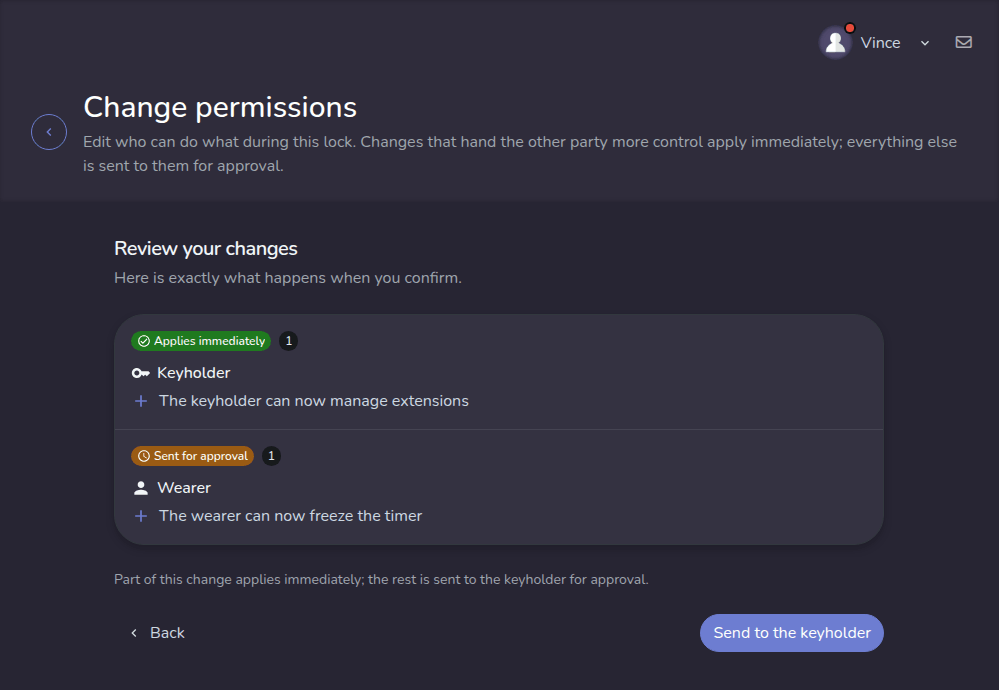
Either party can open the change permissions page from the lock settings and edit the contract. What happens next depends on the change:
- Granting the other party more than they had applies immediately. Either party can always be more generous toward the other.
- Anything else becomes a request. Taking a permission back, or a party granting something to itself, is sent to the other party, who accepts or rejects it. Accepting swaps the lock's permissions for the proposed ones right away; rejecting leaves the permissions unchanged.
- A single edit can be both at once: the generous part applies immediately and the rest is sent for approval.
A lock holds one pending request at a time. Sending a new one replaces the pending one, and either party can withdraw its own pending request. The party whose answer is awaited sees a notice that a permission change needs an answer, and reviews the request from the lock settings.
Every change is written to the lock history: the permissions changing, a request being sent, and a request being rejected all appear there.

Trusting the keyholder
A keyholder is shown as trusted when they have "Manage extensions". The Trusted keyholder preset includes both that grant and Change emergency unlock. Granting extension management alone does not also grant control over emergency unlock; review the actual permissions in your contract.
It is a grant like any other. Because it hands the keyholder more control, the wearer's grant applies immediately; taking it back is a removal, so it becomes a request the keyholder accepts or rejects. Trust is given freely and taken back by agreement, and it is never permanent.